
Find your way around
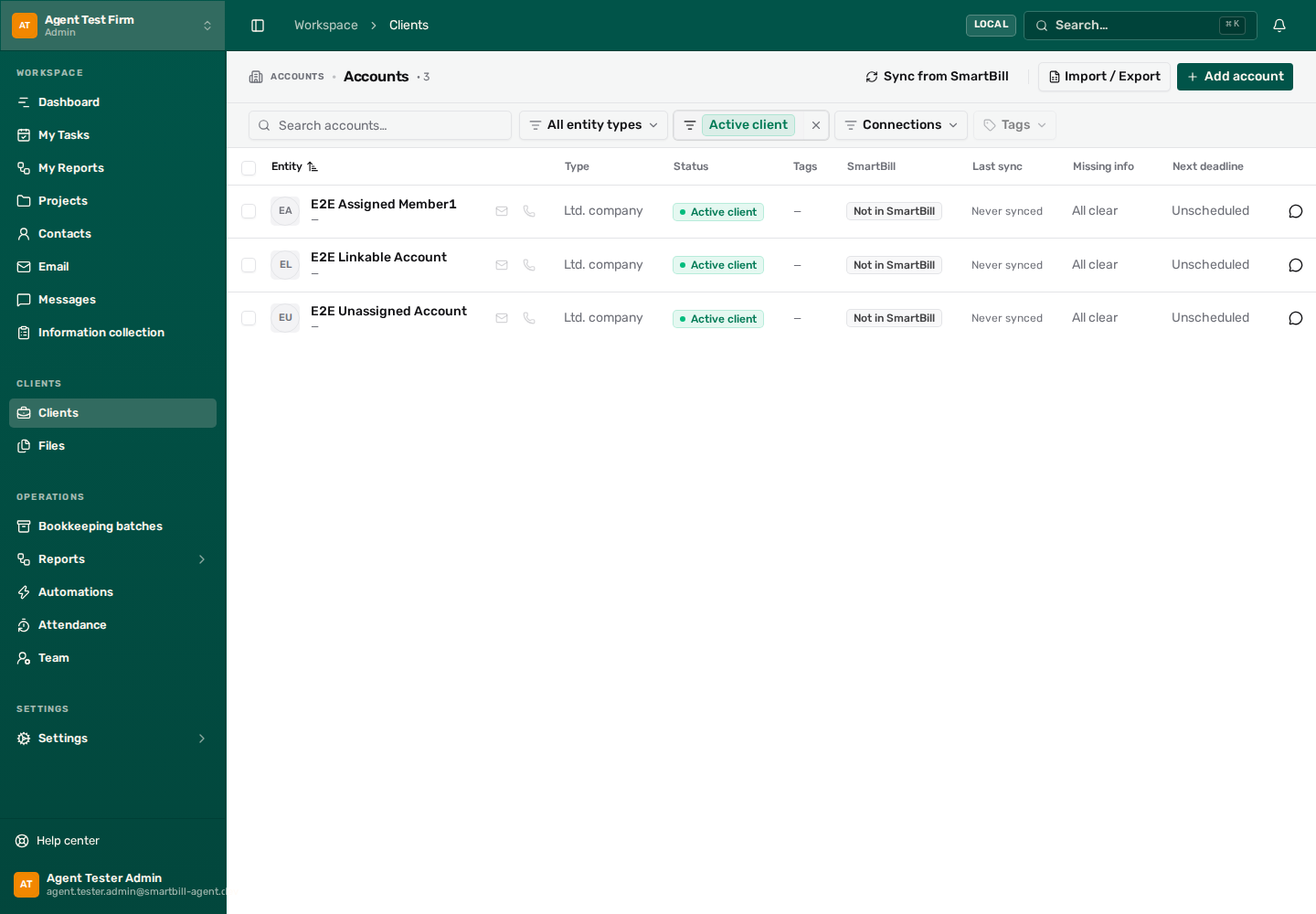 View full size ↗
- Area bar: choose an area.
- Area menu: choose a page.
- Global search: find records across Office.
- List search: narrow the clients on this page.
Move between areas
Link to section: Move between areasA narrow bar at the side of the screen holds the work areas: Work, Clients, Reports, and Operations. Settings is at the bottom of the bar.
- Choose an area in the bar.
- Choose a page in the menu that opens beside the bar.
When you return to an area you already worked in, Office opens the last page you had open there. Choosing the area you are already in takes you to its start page.
Need more room? The menu button in the top bar hides the area menu and keeps the narrow bar. Select it again to bring the menu back. On a phone, the same button opens the bar and the menu together.
Start with the job you want to do
Link to section: Start with the job you want to do| I want to… | Open |
|---|---|
| See my assigned work | Work, then My Tasks or My Reports |
| Work on a business | Clients, then the client name |
| Find a person | Clients, then Contacts |
| See time spent per client | Clients, then Work time (owners and admins) |
| Answer a client | Work, then Messages or Email |
| Ask for documents | Work, then Information collection |
| Review reporting progress | Reports |
| Change settings that apply to you only | Settings → My settings, or My settings in your user menu (your picture at the bottom of the bar) |
Pinned and recent clients
Link to section: Pinned and recent clientsIn the Clients area, the menu shows a client search, Pinned, and Recent.
- To pin a client, point to its name in the menu and select the pin, or select the pin next to the client name inside the client. You can pin up to 20 clients.
- Recent lists the clients you opened most recently, leaving out the ones already pinned.
- Both lists are personal to you and the active office, and follow you to other computers.
- A client you no longer have access to drops off the lists.
Quick actions in the top bar
Link to section: Quick actions in the top barThe top bar keeps a few things you do all the time one click away. At first it holds New task and Messages.
- New task opens a task assigned to you from any page. On a client’s page, the task is about that client, as long as you can add work to it.
- To change the bar, select + at the end of the quick actions (… when some did not fit). From there you can add a page or New task, move items earlier or later, remove them, or choose Back to the default. You can keep up to 6.
- Pin in the same window adds the page you are on.
- Under Suggested for you, Office lists the pages you open most. Now and then, a dashed suggestion appears at the end of the bar for a page you open almost every day. Select it to pin the page, or × to stop suggesting it. Office never adds or moves anything by itself.
- On a narrow screen, what does not fit moves to …. The bar follows you to other computers; the suggestions are learned on each computer separately.
If New task is greyed out, point to it to see why, for example when the office requires clocking in first.
Use search
Link to section: Use search- Select the search box at the top, or press Ctrl+K (⌘K on a Mac).
- Start typing. Clients, contacts, team members and pages are found from the first letter: by part of the name, even with one typo, and by email, phone (starting with 0 or with +972), company number or ID number. Tasks, conversations, opportunities and capital declarations appear below them a moment later.
- Choose a result with the arrow keys and Enter, or select it.
Before you type anything, the box shows New task, Frequent (the pages you use most), your pinned and recent clients, and the main pages. Esc goes back one step, and from the search itself closes the box.
A task from what you typed
Link to section: A task from what you typed- Type what needs doing, for example “Call Dana tomorrow”.
- Choose New task at the bottom of the list, or press Ctrl+Enter.
- Check the details and choose Create task.
The task is assigned to you, and you can choose another assignee, a client or contact and a due date before creating it. “Today”, “tomorrow” or a date such as 25/10 in the title becomes the due date; Keep it in the title puts the words back. When you open the box inside a client, the task starts out about that client.
Actions on a client or contact
Link to section: Actions on a client or contactHighlight a client or contact in the list and press Ctrl+K, or choose Actions on its row. From there you can open it, create a task for it, see the client’s tasks, message the client, open it in SmartBill (once it is connected) or copy its ID number and email.
Searching a person’s name also lists the clients they belong to, marked Via and their name. From a contact’s actions you can open each of their clients.
Search only shows records you can access. If a client is missing, check access and filters.
Move between clients
Link to section: Move between clientsInside a client, the Clients menu shows that client’s pages. Bookkeeping and Reports open inside the menu, underneath their names.
Select the arrow beside Bookkeeping or Reports to open or close its pages. You can also close the section you are working in; it opens again when you go to another of its pages.
To move to another client, use the client switcher next to the client name, or choose Back to accounts at the top of the menu. Check the name again before editing or uploading a file.
Work with long lists
Link to section: Work with long listsUse the page’s search and filters to narrow the list. A wide table may scroll sideways. Clear filters when you want to see the full available list again.
If the connection drops
Link to section: If the connection dropsConnection lost — reconnecting… means Office is waiting for its connection to return. Leave the page open; an ordinary connection interruption keeps the current page and unsaved inputs in place.
If Office needs to restore your session, wait for it to finish. If recovery fails, choose Try again, or Sign in again when offered. A sign-in or loss of office access can close the current screen; unsaved changes are not guaranteed to survive that. If the office is unavailable for your account, ask an office administrator to check your access.