
Prepare a capital declaration, step by step
A capital declaration is the form in which a client lists all their assets and liabilities as of a given date. In Office every declaration lives in one case: from the questionnaire the client fills in, through the records the office enters, to the signature and the submission to the Tax Authority. This guide walks through the case in order. Read it from the start, or jump to the step you are on.
- Client and officeInformation gathering
The client answers a questionnaire and uploads documents. The office reviews them.
- OfficeRecords
The office enters the assets and liabilities and attaches documents.
- ClientClient signature
The client reviews the form through a link, then signs or sends it back with a reason.
- OfficeSubmitted
The office submits to the Tax Authority from here, or marks that it was filed elsewhere.
- OfficeCompleted
The office marks the case closed.
Five things to know before you start
Link to section: Five things to know before you startThe main page: all capital declaration cases
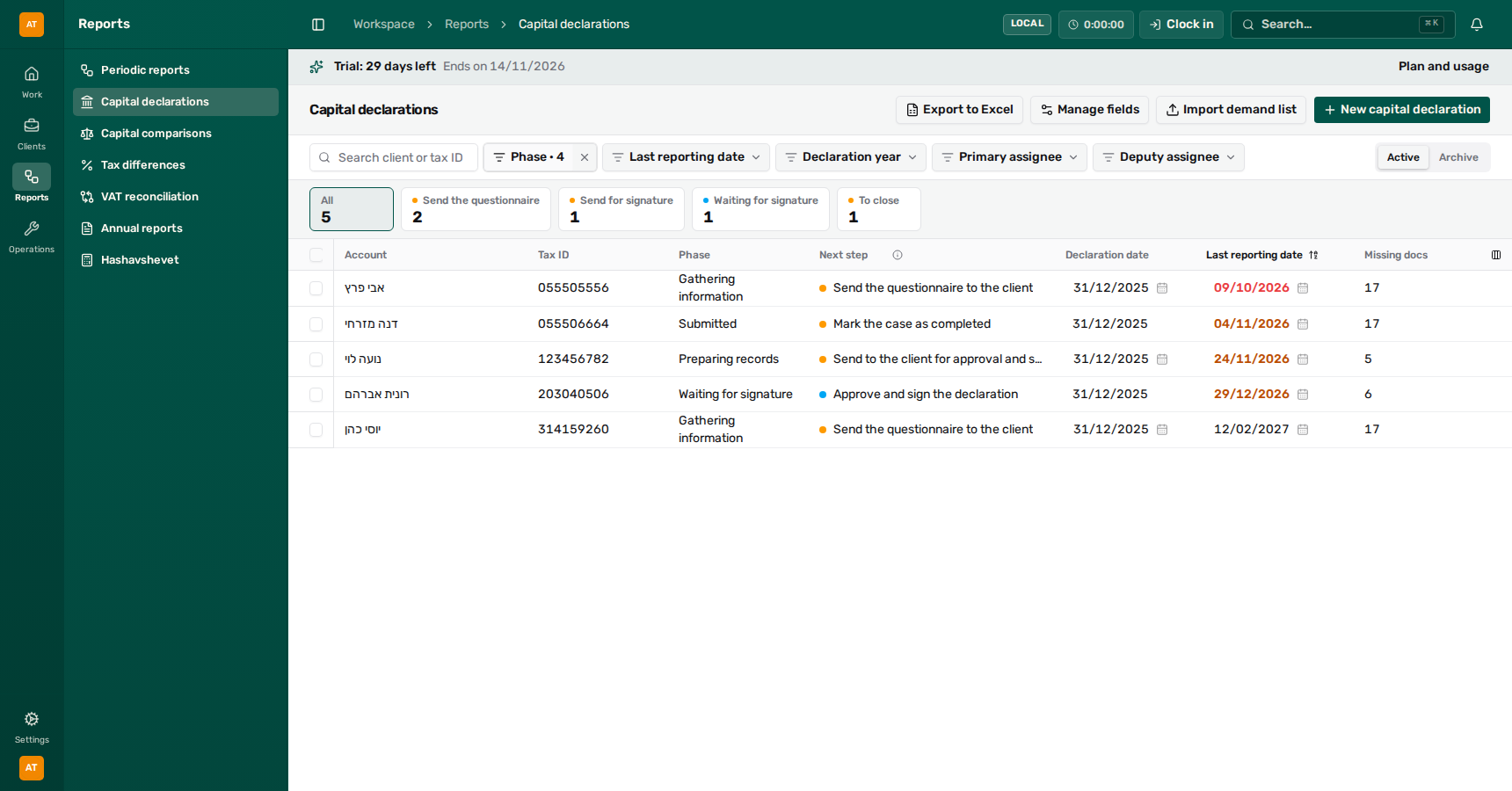
Link to section: The main page: all capital declaration casesOpen Reports → Capital declarations. Every case of the office is in one table.
 View full size ↗
- Search by client name or tax ID.
- Filter by stage, deadline, declaration year and assignees. Completed cases are hidden by default.
- The work queues: how many cases wait for each action. Click one to show only those.
- The next step: what to do on the case and who has to do it.
- The last reporting date: red when it has passed, amber within the next three months.
- New capital declaration, Import demand list, Manage fields and Export to Excel.
What each row shows:
- Phase: where the case stands (see the stages).
- Next step: what to do on the case now. An amber dot: your turn. A blue dot: the client’s turn.
- Declaration date: the day the assets are listed for. You can change it from the table only in the information gathering and records stages.
- Last reporting date: you can change it at any stage. The change does not touch the PDF or the signatures.
- Missing docs: how much is still missing from the client. The number includes unanswered questions, not only files. A new case starts at 17, the number of questions in the questionnaire.
- Primary assignee and Deputy assignee: who handles the case. You can change them right in the table.
Click a row to open the case. The case opens inside the client’s page, and the Capital declarations link at the top of the case returns to the table. A case opened from the client’s page returns there, through Client’s capital declarations.
A reminder to several clients at once: tick cases in the boxes at the start of each row and choose Send reminder. The reminder goes by WhatsApp, only to clients with an open WhatsApp conversation. Submitted and completed cases are skipped.
An assignee for several cases at once: tick cases and choose Set primary assignee or Set deputy assignee, then choose a team member, or Unassigned to remove the assignee. Clear selection clears the ticks. Before anything changes, a window lists every row with its assignee now and after, and nothing changes until you choose Assign. If some rows could not be updated, the message names them.
Filter and sort the table
Link to section: Filter and sort the tableAbove the table, the work queues count the cases waiting for each action: Send the questionnaire, Questionnaire with the client, Review and follow up, Preparing, Send for signature, Waiting for signature, To file, To close and Done. Click a queue to show only its cases, and All to show every case again. The counts follow the other filters. Empty queues are not shown.
Under the page header there is a search and a filter for everything worth slicing by: Phase, Last reporting date, Declaration year, Primary assignee and Deputy assignee. Each filter takes several values at once, and the assignee filters also offer Unassigned. A field the office added gets its own filter when it is a choice, a multiple choice or a yes/no field. While any filter is applied, Clear filters appears and brings every case back.
To sort, click a column heading. Click again to reverse the order. Cases with no value in that column (no assignee, no last reporting date) always stay at the end.
The list remembers your search, filters, sorting and column order, and you can save views of your own. See Arranging lists and saved views.
Export to Excel downloads an Excel file with the rows shown now, with the search and filters.
Remove a case from the list (archive)
Link to section: Remove a case from the list (archive)A case opened by mistake, or one the office no longer handles, goes to the archive:
- Tick the case, or several cases, in the boxes at the start of the row.
- Choose Archive. The confirmation lists the selected cases: check it and confirm.
What happens: the cases leave the list, search and the client’s page. Client reminders stop, and links already sent to the client stop opening. While the case is archived, nothing can be sent to the client from it: no questionnaire, link or signature request. Nothing is deleted: the questionnaire, the records and the files are kept.
To see what was removed, switch from Active to Archive beside the table. There, tick cases and choose Restore, and they return to the list as they were. Reminders that stopped do not start again on their own: send to the client again if needed. Importing the client’s row from a demand list again also brings the case back to the list.
Step 1: Open a case
Link to section: Step 1: Open a case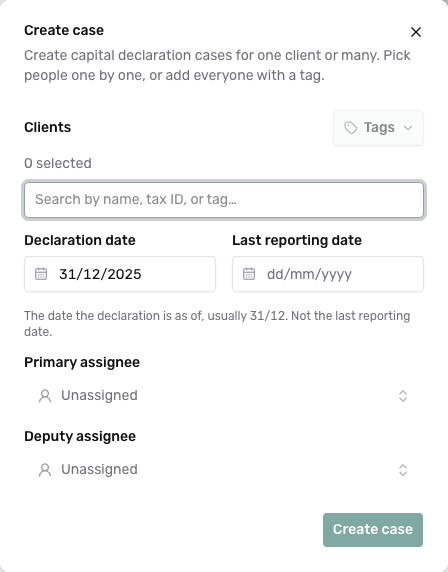 View full size ↗
- On the capital declarations page choose New capital declaration.
- In Clients, search for the client by name or tax ID. You can choose several clients, or add every client with a tag.
- Check the Declaration date. It is filled with 31/12 of last year. Change it only if the Tax Authority asked for a declaration as of another day.
- Fill in the Last reporting date. It is required: copy it from the demand the client received.
- Choose a Primary assignee, and a Deputy assignee if needed.
- Choose Create case.
What happens: each client gets a case at the Information gathering stage, with a questionnaire ready to send. If you chose one client, the case opens right away. The declarant details (name and ID number) are copied from the client card, so check them later.
You can also open a case from the client: in the client menu choose Reports → Capital declarations → New capital declaration. The same window opens, without client selection: fill in the declaration date, the last reporting date and the assignees. On the client’s page every case shows its stage and next step, as in the main table.
Many demands at once: import a demand list
Link to section: Many demands at once: import a demand listWhen a list of demands from the Tax Authority arrives in a file:
- On the capital declarations page choose Import demand list.
- Drop the file (CSV or Excel) and choose the sheet and the header row.
- Match the columns. Required: Tax ID, Name, Declaration date and Last reporting date. A year alone (for example 2025) is read as 31/12 of that year. You can also match the assessing officer, assignees, and fields the office added.
- Choose Preview and check the rows. A wrong value is marked red, and you can fix it by clicking the cell. Rows with problems shows only what needs fixing.
- Untick rows you do not want, and choose Approve and import.
The Status column says what each row will do:
- Will create a new account and case: no client has this tax ID yet.
- New case for an existing account: the client exists and has no case for this year.
- Will update, with the field names: the client already has a case for this year, and the file differs from it. The cells that change are highlighted, and hovering shows the current value.
- Already exists, no change: the case already matches the file. The row is not imported.
- The case stays as it is; the client’s details will be updated: the case matches the file, but the row brings the client an email, phone or business type.
- Archived. Will return to the list: the case was removed earlier, and the import brings it back.
When the file holds both new cases and updates, use Import to choose Everything, New only or Updates only. Nothing is created or changed before you approve, and the message at the end tells you how many cases were created, updated and restored.
What an update changes: the last reporting date, the assessing officer, the assignees and fields the office added. An empty cell in the file never clears an existing value. The declaration date changes only in the information gathering and records stages, as in the table. In later stages the cell is marked and the case keeps its own date. The client’s name does not change.
Match employee names: Office matches the assignee names in the file to team members. A name it cannot find (a first name only, for example) is marked in its cell, and the Match employee names button shows how many names were not found. Open it to see every name from the sheet and who it was matched to, pick a team member by hand, or choose Leave empty. Under Assign unmatched names to you can pick a default assignee, who takes every name that was not found, in the primary assignee column and in the deputy column alike. A match applies to every row with that name, and the preview updates right away. A name left unmatched does not change the assignee.
Email, phone and business type: You can also map Email, Phone and Business type. Email and phone go to the client’s contacts, and nothing already there is deleted: if the client already has a contact with that email or phone, nothing is added (only a detail it is missing); if another contact in the office already has them, that contact is linked to the client instead of being copied; if the client’s main contact has no email and phone, they are added to it; and if it has a different email or phone, a new contact is added. The Contact column in the preview shows what happens for each row. A new client takes its business type from the file. When the file names a different business type for existing clients, those cells are highlighted, and before approving you choose Keep the current type or Update from the file.
Importing a demand list is open only to owners and system admins.
Your own fields
Link to section: Your own fieldsOffice admins can add their own fields to the cases, for example a fee or an internal status. On the capital declarations page choose Manage fields, enter a name, choose a type and choose Add field. Each field appears as a column in the table and in the case under Declaration details → Custom fields. Such a field saves immediately and never deletes the PDF or signatures.
To hide a field from some of the team, set Who can see this field to owners and admins only, or to specific members and teams. Anyone not chosen will not see the field anywhere, including exports. Who can edit this field works the same way for changes. A lock next to the field name shows that it is not open to everyone.
Read the case header
Link to section: Read the case headerThe top of every case has two lines that tell you exactly where the case stands and what to do.
 View full size ↗
- The last reporting date, colored by urgency.
- The stage: where the case is in the process.
- Next step: who has to act now, and what.
- The person handling the case. Click to change.
- The button that does the next step.
- Reporting: PDF, downloads and submission to the Tax Authority.
The stage and the Next step are two different things:
- The stage (Information gathering, Records, Client signature, Submitted, Completed) moves only when someone acts: the office clicks a button, or the client signs or declines.
- The Next step updates by itself and tells you who has to act now, and what. Your turn (amber) means it is the office’s turn, with what exactly to do next to it. Client’s turn (blue) means you are waiting for the client, for example because they have not opened the link yet. Nothing open (green) means there is nothing to do right now. The buttons that do the step sit next to it. It is the same next step as on an annual report case, and here too you can add a Manual step, such as Manager review before the signature (see Manual steps).
The main button changes with the stage:
| Stage | Button | What it does |
|---|---|---|
| Information gathering | Move to records | Moves to records |
| Records | Send for signature | Prepares the PDF and sends it to the client to sign |
| Client signature | Send for signature (until the client signs) | Sends the signing link again |
| Client signature | Submit to the Tax Authority or Mark as filed (after the signature) | Submits from here, or records a filing made elsewhere |
| Submitted | Close the case | Closes the case |
A greyed-out button does not work right now. Hover over it to read what is missing. Someone who can only view the client sees the case but cannot change it.
Under the next step a short line shows what already happened in the case: when the questionnaire was sent, when the client submitted it, when they signed and when the declaration was filed.
Move to another stage: in the ⋯ menu at the top of the case choose Move to another stage and the stage. This takes a case back to an earlier stage, and reopens a completed case too. Submitted and Completed are available only once a filing is recorded.
When the client submits the questionnaire, signs or declines, the case assignee gets a notification in the Attention bell. If there is no assignee, the person who sent the link gets it.
Step 2: Collect information from the client
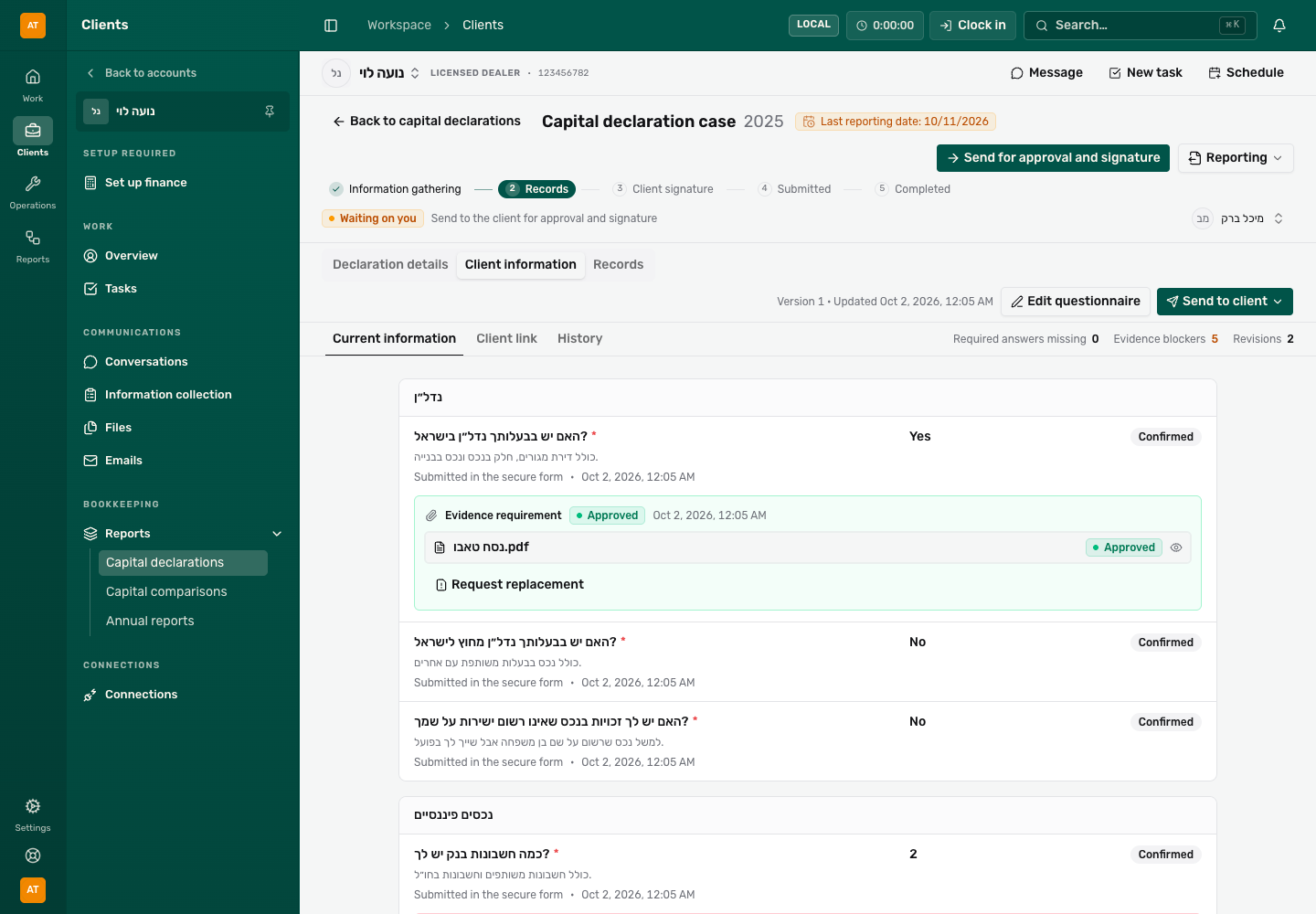
Link to section: Step 2: Collect information from the clientThe Client information tab is where you ask the client for information and review what arrived.
 View full size ↗
- Send to client: copy the link, WhatsApp or email.
- Edit questionnaire: fix an answer the client gave on the phone.
- How many required answers and documents are still missing.
- The client answer and where it came from.
- A document request with the file the client uploaded and its review state.
Send the questionnaire
Link to section: Send the questionnaireIn a new case, the Client information tab opens with the standard questionnaire already open for editing. Before sending you can fit it to the client: delete questions that don’t apply, add one with Add question, or answer what you already know for them (yes-or-no questions are answered by clicking Yes, No, or Not known). There is no need to save: sending saves the questionnaire. If you have to stop halfway, Save without sending keeps your changes without sending. After sending, make further changes with Edit questionnaire.
- In the Client information tab choose Send to client.
- Choose how to send:
- Copy link copies a secure link that you paste wherever you like.
- Send on WhatsApp or Send by email opens a send window with a ready message and the link inside. See Send to a client.
- The Next step at the top of the case shows when the client opened the link and whether they started filling it in.
The link is valid for 14 days, and every automatic reminder extends it by another 14 days. Sending again while it is still valid sends the same link. Until the client submits the questionnaire, the system reminds them to finish, including ahead of the last reporting date. The client answers 17 yes-or-no (or number) questions, and every “yes” asks for a document. You can send the client the guide to answering a request.
Review a document the client uploaded
Link to section: Review a document the client uploadedA document nobody has reviewed yet is marked amber Needs review. Open it before you decide: click the eye next to the file name.
 View full size ↗
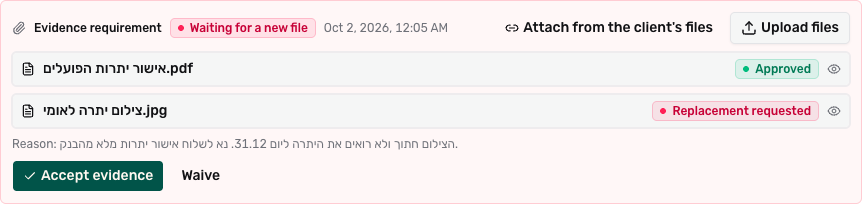
Choose one action:
- Accept evidence: the document is right. The card turns green.
- Request replacement: something is wrong. Write the client what is wrong (required) and choose Request a new file. The client sees your explanation in their link.
- Waive: the document is not needed. Write why (required) and choose Waive.
 View full size ↗
You can also do the work for the client: Attach from the client’s files attaches a file the office already has, and Upload files uploads one from your computer. An approved document can be reopened with Request replacement, and a waiver is undone with Cancel waiver.
An answer the client gave on the phone
Link to section: An answer the client gave on the phoneChoose Edit questionnaire, change the answer (Yes, No or Not known), write why in the reason box and choose Save. Note: saving confirms every answer in the questionnaire, including suggestions carried over from last year.
If the client answered differently from what the office has, a Conflicts tab appears. Open it, write a reason and choose Accept client value or Keep current value.
Finish gathering
Link to section: Finish gatheringWhen everything has arrived and is approved, click Move to records at the top of the case. The case moves to the Records stage, and the Records tab opens.
If you must move on before everything arrived, the same button shows with an outline only. Hover over it to see what is missing. Clicking it opens Skip gathering?, and you confirm with Move to records. What is missing does not disappear: you can keep receiving and reviewing documents in the later stages.
Step 3: Check the declarant details
Link to section: Step 3: Check the declarant detailsThe Declaration details tab holds the details printed at the top of the form. When something is missing, the tab shows a red Incomplete badge and you cannot send for signature.
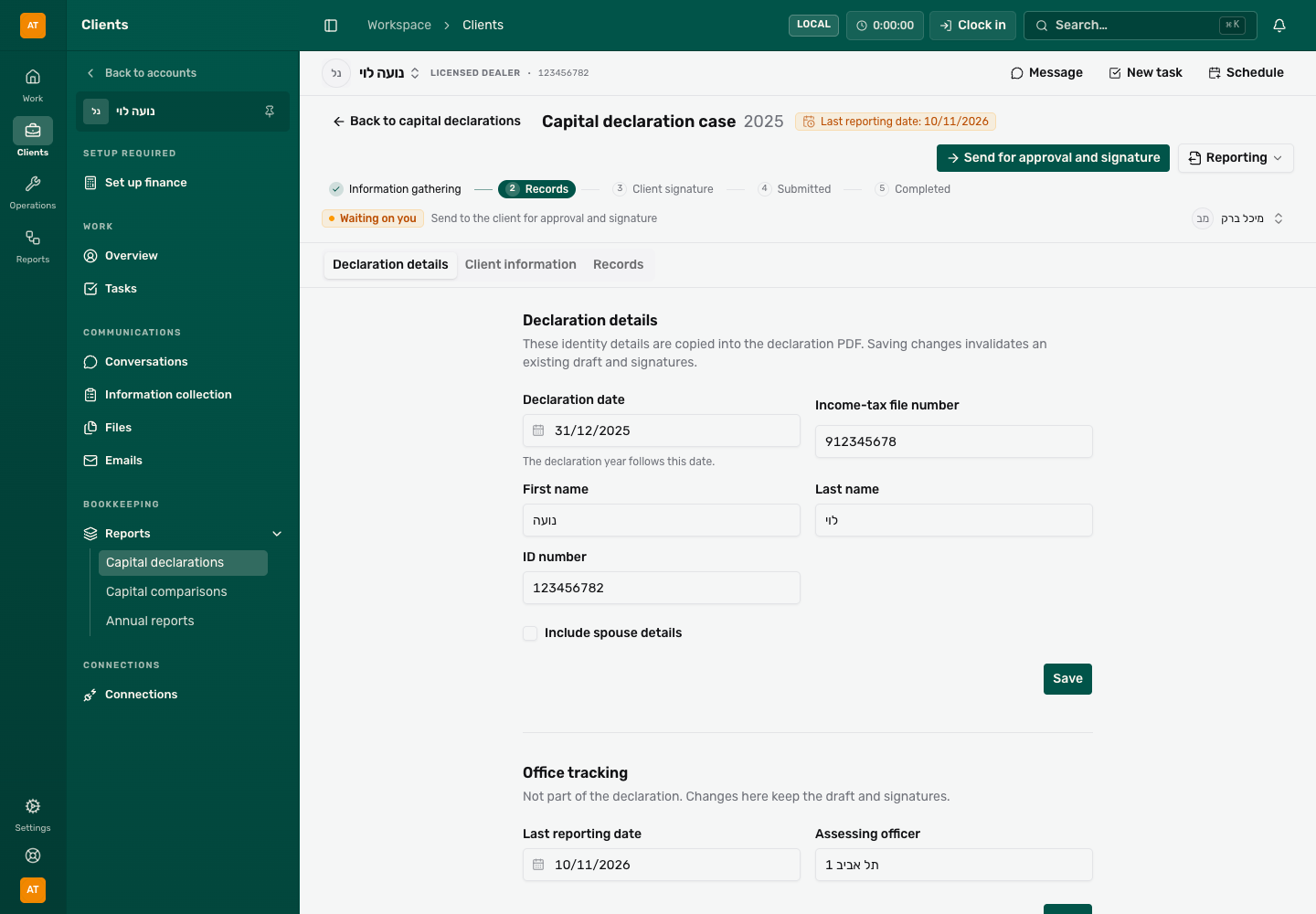 View full size ↗
- First name, last name, ID number and file number: all required before signature.
- Spouse: if you tick it, the spouse has to sign too.
- Office tracking: changes here never delete the PDF or signatures.
- Check First name, Last name, ID number and Income-tax file number. In a new case the name comes from the client card: the first word as the first name and the rest as the last name, so fix it if needed.
- If the declaration includes a spouse, tick Include spouse details and fill in their three fields.
- Choose Save.
Step 4: Enter the records
Link to section: Step 4: Enter the recordsThe Records tab is the main work: here you enter every asset and every liability, row by row, with the matching document open beside you.
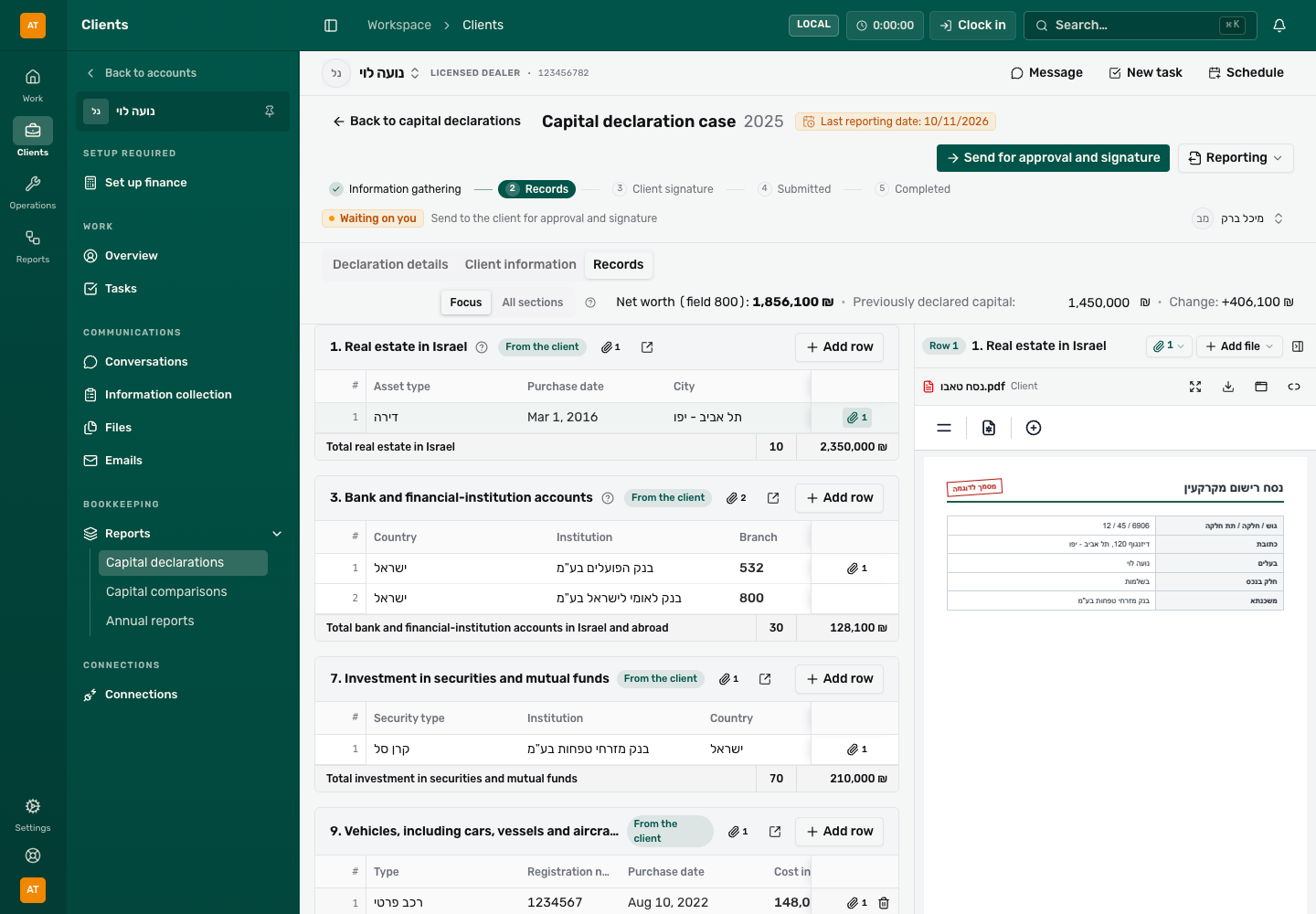 View full size ↗
- Focus or All sections: which sections are shown.
- Net worth, previously declared capital and the change between them.
- A section of the form, numbered and named like the official form.
- Add row to the section.
- Paperclip: the files of this row.
- The documents pane: the file is open next to the table.
How the page is built
Link to section: How the page is built- Each section is a table from the official form, in the same order and with the same number: 1. Real estate in Israel, 3. Bank accounts, 9. Vehicles and so on. Businesses follow (Part B and Part C), and Part D comes last.
- Each section ends with a Total row with the form field number (for example 10) and the sum.
- The From the client badge marks a section the client answered “yes” to or uploaded files for.
- Some sections have a question mark next to the title. Hover over it to see what the section covers.
Focus or All sections
Link to section: Focus or All sectionsOnce the client has answered the questionnaire, you can switch at the top between Focus and All sections:
- Focus shows only the sections that matter for this case: the client said they have such an asset, files were uploaded to the section, or it already has rows.
- All sections shows all 19 sections.
Only empty sections are hidden, so nothing is missing from the declaration. If the client forgot to mention an asset, switch to All sections to enter it. Your choice is remembered in your browser.
Add a row and fill it in
Link to section: Add a row and fill it in- In the right section click Add row. An empty row is added.
- Click a cell to type in it. Enter or Tab saves and moves to the next cell. Esc cancels what you typed in the cell.
- Amount cells accept arithmetic, for example
12,400+3,150or4,000*17%. The result is saved rounded to agorot. If the arithmetic does not work out, the previous amount stays. - In choice cells such as City, Street, Country or Institution, type a few letters and pick from the list. Street opens only after you choose a city.
- Not in the list? Choose Other. Some fields then open a Details box for free text.
The amounts add up by themselves in the Total row and in Net worth at the top.
Delete a row: hover over the row and click the bin at its end. The row is deleted immediately, with no confirmation. Files attached to the row are not deleted: they go back to the section.
Saving
Link to section: SavingThere is no save button. Every change saves on its own after a moment, and Saving… then Records saved appears next to the tabs. If you see Could not save records, click Try again and do not close the page until the save succeeds.
Attach a document to a row
Link to section: Attach a document to a rowThe documents pane on the side of the page shows the file you are working from, so you can copy from it without searching.
- Click the paperclip at the end of the row. The pane switches to that row and shows Row 1 (or its number) at the top. The paperclip next to the section name shows all the section’s files.
- To add a file to the row choose Add file:
- Upload from computer, or drag the file onto the pane.
- Attach an existing file to pick a file already in the client’s file library.
- The row has several files? Open the paperclip menu at the top of the pane and pick a file. The Other files in this section group lists section files not yet on this row. When you pick one of them the pane says This file belongs to the section, and Attach to this row moves it to the row.
The line above the file shows its name and who uploaded it (Client or Office), and the actions on it: full view, download, Pop out to another window (a window that follows you as you move between rows, handy on a second screen), Detach from this row (the file goes back to the section) and Delete file (only for files the office uploaded; the file moves to the archive). Need more room for the table? Hide documents folds the pane away.
On screens narrower than 1280 pixels the pane opens as a window over the page instead of at the side.
Net worth and previously declared capital
Link to section: Net worth and previously declared capitalAt the top you see Net worth (field 800): all assets minus all liabilities, businesses included. Part D is not counted. Next to it is Previously declared capital: click Add and enter the capital from the client’s previous declaration. Once entered, Change appears: the difference between today’s capital and the previous declaration.
A large section in full screen
Link to section: A large section in full screenFor a section with many rows, click the Open section workspace icon next to the section name. Choose a view: Table, By column (each row in a column) or By row (each row as a card). Back to all sections closes the full screen.
Step 5: Send to the client for signature
Link to section: Step 5: Send to the client for signatureWhen the records are ready and the details are complete:
- At the top of the case click Send for signature. If there is no PDF yet, Office saves the records and generates one (Generating PDF…).
- A preview of the form opens. Go through it. This is the last chance to catch a mistake before the client sees it.
- All correct? Click Send for signature. Found a mistake? Click Close, fix the records and try again.
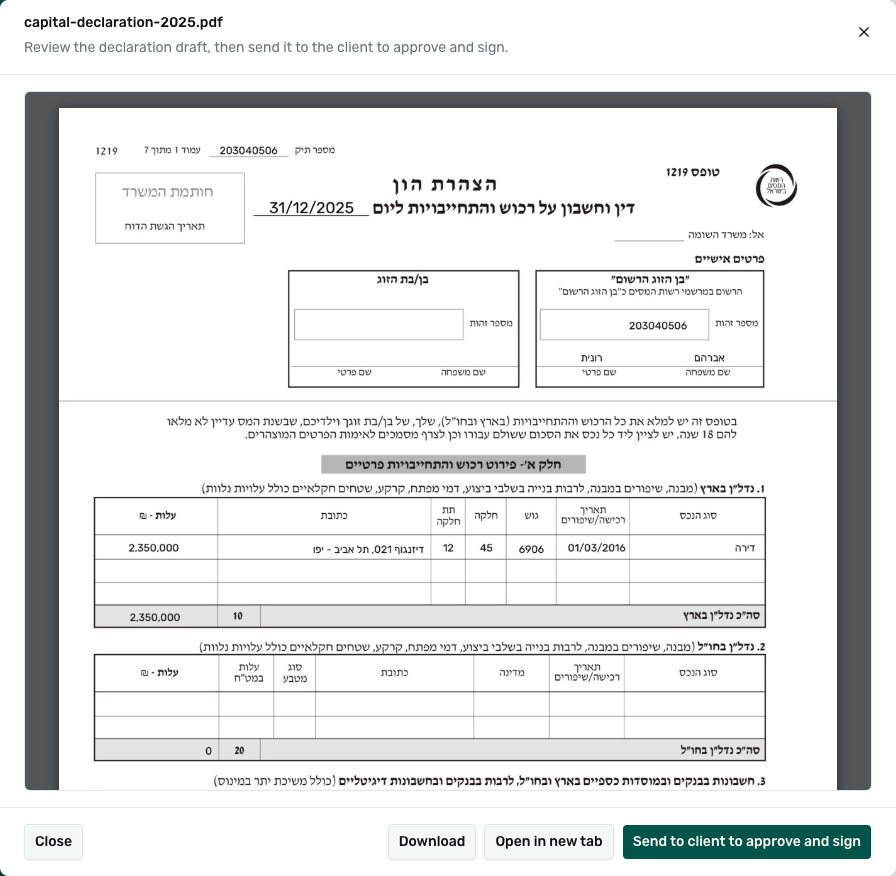 View full size ↗
- The Send to the client window opens. Choose a contact and tick WhatsApp, Email or both. For email the Capital declaration to sign template is chosen for you. Check the preview and click Send.
- Want to send it another way? Click Copy link and send it yourself.
What the client sees
Link to section: What the client seesThe client opens the link and sees a summary of the declaration and the form. They sign with a finger or the mouse and click Confirm and sign, or write a reason and click Decline. If the case includes a spouse, there are two signatures. See the client guide.
The link is valid for 14 days and works once: after signing or declining it stops working. Until then the client gets automatic reminders to sign, and each reminder extends the link. The Next reminder button at the top of the case lets you see, pause, or send a reminder now.
After the client signs
Link to section: After the client signs- A The client signed the capital declaration notification arrives in the Attention bell.
- The Next step says The client signed. Submit the declaration to the Tax Authority, with the Submit to the Tax Authority and Mark as filed buttons next to it.
- The old PDF is deleted. Before submitting you generate a new one, with the signature (see the next step).
If the client declines
Link to section: If the client declines- A The client rejected the capital declaration notification arrives with the reason they wrote.
- The case goes back by itself to the Records stage, and the Next step shows the reason.
- Fix what is needed and click Send for signature again. The reason disappears from the line at the first save of the records, so copy it if you will need it.
Step 6: Submit to the Tax Authority
Link to section: Step 6: Submit to the Tax AuthorityYou can submit to the Tax Authority from here, or file elsewhere (on the Tax Authority’s site or on paper) and mark it in the case. Either way the case moves to Submitted and the filing date and confirmation number are recorded.
Submit from here
Link to section: Submit from hereBefore the office’s first submission: an owner or system admin has to connect the office to the Tax Authority under Settings → Israel Tax Authority, and enter the Representative number there. Only owners and system admins can submit from here.
- Make sure the client has signed (the Next step says The client signed. Submit the declaration to the Tax Authority).
- Choose Reporting → Generate PDF. The new file includes the signature. Check it.
- Choose Reporting → Submit to the Tax Authority.
If the submission succeeded: the message Submitted to tax authority appears, the case moves to Submitted, and the Submission reference with the Tax Authority’s number appears under the case header.
If the item is greyed out: the line under it says exactly what is missing, for example that the client has not signed yet, that a PDF has to be generated first, or that the spouse signature is missing. Complete it and try again.
If the submission failed: Latest submission error appears in red under the case header with the explanation. If it says there is an earlier submission that has not been resolved, do not keep retrying: contact support.
Resubmitting: in a submitted case, Submit to the Tax Authority opens Resubmit the capital declaration?. A resubmission replaces what was submitted before. Choose Resubmit and overwrite only if you are sure.
Filed elsewhere: Mark as filed
Link to section: Filed elsewhere: Mark as filedAnyone who can edit the client can mark a filing.
- Click Mark as filed next to the next step (after the client signed), or choose Reporting → Mark as filed at any stage.
- Choose the Filing date. It starts as today.
- If you have them, type the Confirmation number and attach the Filing confirmation. Both are optional. The file is kept in the client’s files and linked to the case.
- Click Mark as filed.
What happens: the case moves to Submitted, the client’s signing reminders stop, and the confirmation number appears under the case header.
Marked by mistake? In the ⋯ menu choose Undo the filing record. The record is removed and the case goes back to Client signature. A submission sent from here to the Tax Authority cannot be undone: they already have it.
Step 7: Close the case
Link to section: Step 7: Close the caseIn a submitted case click Close the case. The case moves to Completed and disappears from the main table (you can show it again with the stage filter). Need to reopen it? In the ⋯ menu choose Move to another stage and the stage.
After submission the records, files and declaration details are locked for editing. You can still change assignees, office tracking and your own fields, and download files.
Download the declaration and attachments
Link to section: Download the declaration and attachments View full size ↗
In the Reporting menu at the top of the case:
- Download PDF: the form only.
- Download attachments: a ZIP of every document attached to the case, with a folder per section (for example
א-1. נדל״ן בארץ). Row files start withRow 1 -so it is clear which row they belong to. - Download full bundle: the form and all the attachments together, in one ZIP.
Before every download Office saves your work and generates a current PDF if needed, so you always get the current version. Documents you asked to replace, and files still in the security scan, are left out. If a file fails to download, the final message says which files were left out.
When something goes wrong
Link to section: When something goes wrongSend for signature is greyed out. Hover over it. Usually declarant details are missing in Declaration details (first name, last name, ID number and file number), or no record has been entered yet.
The client did not get the link. At the client signature stage click Send for signature and send again, or copy the link from the send window and send it yourself. Every send creates a new link.
The client says the link does not work. A link is valid for 14 days, and after signing or declining it closes. Send a new link.
I changed a record after the client signed. The signature was deleted. Click Send for signature and send the client to sign again.
Submitting says a PDF has to be generated first. That is normal after a signature: choose Reporting → Generate PDF and try again.
I deleted a row by mistake. There is no undo. Add the row again. Its files were not deleted: they are in the section, and you can attach them to the new row.
A file is on the wrong row. Open it in the pane and choose Detach from this row. Then go to the right row, pick the file from Other files in this section and click Attach to this row.
A client needs a declaration for a year that already has a case. Each client has one case per declaration year. Open the existing case from the table.